In this article
Key takeaways
- On many Shopify stores, /collections/all?sort_by=best-selling lists the products in the store's own best-selling order: a ranking without numbers.
- The /products.json file gives each product's update dates: a sign of activity, not a sign of sales.
- The most honest signal available is an ad that lasts for weeks: no advertiser keeps paying for an ad that does not sell. And 22% of Shopify store ads are catalogue ads, against 9% across the Gulf.
- Units sold, revenue and conversion rate are visible to no tool; any sales figure for someone else's store is an estimate.
What "best selling" means when sales are secret
A Shopify store's sales are kept in its owner's dashboard: orders, revenue, conversion rate and profit. No public file reveals them and no tool reads them. Anyone promising you an exact sales figure for another store is giving you an estimate.
What you can do is combine three public signals, each incomplete alone and strong together:
- The store's ranking: which products the store puts first under "best selling".
- Product activity: which ones are updated and edited all the time.
- The ads: which product the store has been paying to advertise for weeks.
The other public methods (theme, sitemap, pixels) are in the complete guide: Spy on a Shopify store.
Window one: the store's best-selling order
Add /collections/all?sort_by=best-selling to the store's address. On many Shopify stores the products appear ordered by sales as the store itself computes them.
- Trust only the top rows: the gap between the first and the tenth product is clear; between the third and the fourth it may be tiny.
- The ranking gives no numbers: the first sells more, but you cannot tell whether it sells ten or a thousand.
- Come back: note the top five today and compare in two weeks. A product climbing to the top is moving now.
- Some stores block or change it: if the order never differs from the default, it may not be active.
Window two: update dates in products.json
Add /products.json to the store's address. On many stores a file appears with every product, its price and its update dates. Look for:
- Recently updated products: the store is working on them now; the reason can be a new price, a picture or stock.
- Products that were not in the file on your last visit: what the store is testing these days.
- Prices that changed between two visits: a new discount, or a price raised after a success.
Careful: an update is not a sale. A store editing a hundred products in one day may only have changed its description template. Read the dates together with the ranking and the ads, never alone.
Window three: what the store keeps in its ads
This is the most honest of the three, because it costs money: an advertiser stops the ad that does not sell and keeps the one that does for weeks. So the product in the store's longest-running ads is the closest thing to "best selling" you can see from outside.
- In GccFY open the Domains screen, pick the Shopify platform, and search the store's domain.
- Open its ads, sort them by longest running, and look at its ads in each country.
- Open the store page behind each old ad: which product, at what price, with what offer.
- Compare: is the same product first in the store's ranking? Was it updated recently?
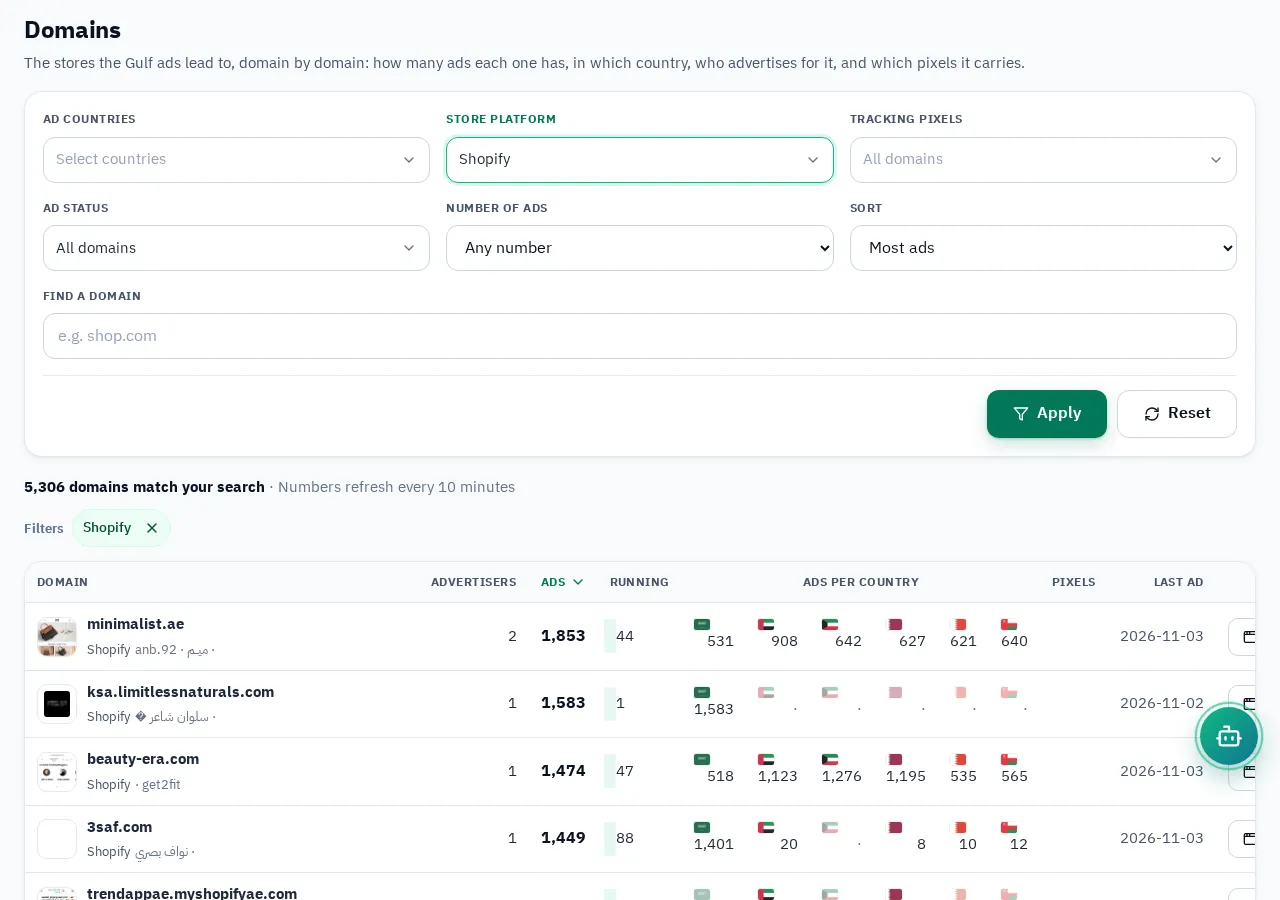
Keep in mind that 22% of Shopify store ads in our study are catalogue ads that pick the product for each viewer, far above the Gulf average (9%). Those do not reveal one product, so focus on regular image or video ads for a single product. Why running time beats any other figure: Ad running time.
Combine the three windows: a decision table
| Situation | Reading |
|---|---|
| First in the ranking + in an ad lasting weeks + in other stores' ads too | Probably a winner: worth studying |
| First in the ranking + no ads | Sells to the store's regular customers, from unpaid traffic, or from ads on another platform (Snapchat, TikTok) |
| Many new ads + a new product in products.json | A test in progress: wait and watch |
| An old ad that stopped + the product dropped in the ranking | A wave that ended |
And the strongest signal outside the store: a product advertised by several different stores at the same time. What Gulf Shopify stores sell in general: What Shopify stores sell; how to spot a winning product from its ads: Winning products.
What no one sees, and what to do about it
- Units sold and revenue: private. The ranking gives you the leader, not the quantity.
- Conversion rate and cost per order: only in the advertiser's ad account.
- Profit: you know neither the cost of goods nor shipping nor returns.
So do not build your decision on "how much does my competitor sell" but on "what do they insist on selling". A product the store has advertised for weeks and lists first deserves a test with your own offer, price and pictures, not a copy of their ad.